
Appearance
如何添加“北京理工大学”水印
计算机学院要求本科毕业设计必须有“北京理工大学”水印,添加方法如下。
效果截图

下载水印底图
background.pdf,保存到images/目录,并重命名为background.pdf知网毕设系统会导出 Word 和 PDF,二者水印不一样。可任选一种下载:Word 效果底图、PDF 效果底图。
两种底图的区别
- 左:Word效果——编辑系统导出的 Word,再导出 PDF 得到。
- 右:PDF效果——直接编辑系统导出的 PDF 得到。
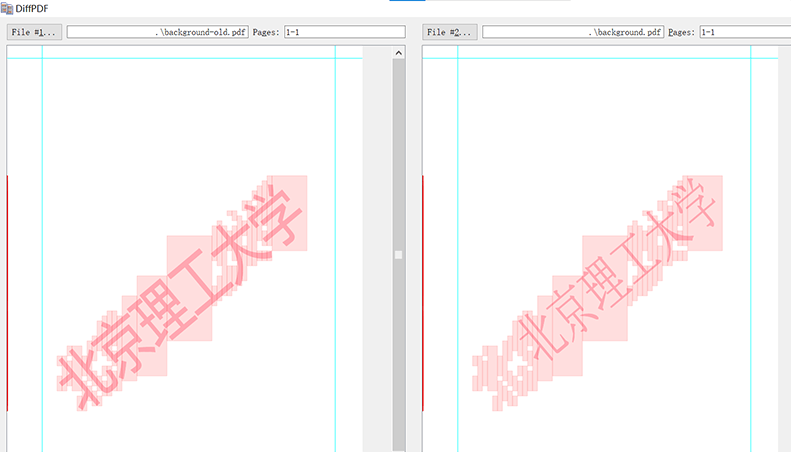
编辑
main.texlatex\newcommand\BackgroundPicture{% \put(0,0){% \parbox[b][\paperheight]{\paperwidth}{% \vfill \centering% \includegraphics[width=\paperwidth]{images/background.pdf} \vfill }}} % 文档开始 \begin{document} \AddToShipoutPicture{\BackgroundPicture} …如需进一步调整水印透明度,可参考:graphics - Includegraphics: set image opacity - TeX - LaTeX Stack Exchange。
重新编译
另法:直接操作 PDF
上述方法重新编译原有LaTeX项目,这种方法直接操作既有的old.pdf。
同上下载水印底图
background.pdf保存以下内容为
main.texlatex% !TeX program = xelatex \documentclass{bithesis} % 需要用 bithesis 修改页面尺寸 \usepackage{pdfpages} \newcommand\BackgroundPicture{% \put(0,0){% \parbox[b][\paperheight]{\paperwidth}{% \vfill \centering% \includegraphics[width=\paperwidth]{images/background.pdf} \vfill }}} \begin{document} \AddToShipoutPicture{\BackgroundPicture} \includepdf[pages=-]{old.pdf} \end{document}编译
main.tex